








WordPress can now describe itself to machines
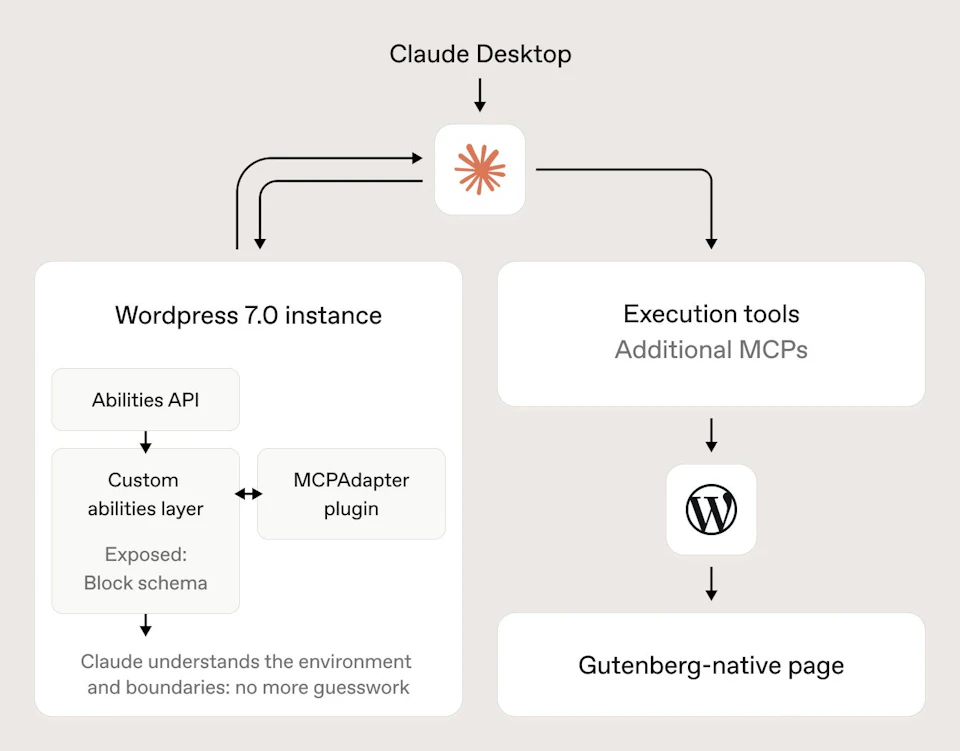
WordPress 7.0 landed back in May with AI infrastructure in core. There’s an AI Client, a Connectors screen where the provider keys live, and the Abilities API, which actually arrived back in 6.9. Abilities are how core, plugins and themes describe what they can do in a way a machine can read. The MCP Adapter, a separate plugin rather than part of core, turns those into tools an agent can call.
Rather than read about it, we connected Claude Desktop, armed with a few execution tools and started asking it to build pages.
The first attempt was a mess. It produced markup that no block in the theme owned, the editor flagged the content as invalid, and the result was a set of pages that looked passable on the front end and were unusable the moment anyone opened them to make a change. More prompting wasn’t going to fix that.
The fix wasn’t to give it less to do, but to give it the exact blueprint. Before it could safely push content, it needed to understand the environment. We exposed the custom block library, the post types, and the taxonomies.

Once the agent understood the schema it had to work within, the output stopped being inventive and started being usable. With a direct line into the environment, Claude built pages from a brief, drafted and tagged posts, and all of it came back as valid Gutenberg content, made of the same blocks a person would use. That keeps both ways of working open: the pages edit normally in the block editor, and the agent can pick them up again next time it’s asked to make a change.
All the difference between the two attempts came down to the schema. The block library was working as a guardrail — the agent could only produce what the theme already knew how to render, and that constraint is what made the output safe to keep.
Structured content is the real prerequisite
All of this runs on structured content, and that’s bad news if you’re on a page builder. If your layouts live in a proprietary format, as they do on a lot of Elementor and Divi sites, an agent reads shortcode soup and can’t safely write back into it. Whether you get to use any of this was settled whenever someone decided how your content would be stored, probably years ago and probably without much of a conversation. We’ve argued for block-native builds for a long time, mostly on maintenance grounds. This is a better argument.
None of it is a button that builds you a website. It’s assisted work, and it wants scoping and review like anything else does. What’s changed is that WordPress now has a proper, permissioned way of being talked to by a machine, and the sites that stand to get something out of it are the boring, well-structured ones.
